Find out · · 14 min read
Making Kortress Beach: Building a Nighttime Shore for Sitting Together and Sharing Music
In this post
- What can you do at the beach?
- Sitting and walking together draw on earlier memories
- Holding hands makes wrist misalignment stand out
- The ground needed to get wet after the wave reached it
- The moment a fuse lights is part of the scene
- Connecting a sparkler's drawn line to the character's hand
- Shared music carries through the time spent sitting
- Other people need to see the beach as it is now
- Refining the controls before the beautiful scene
- Visit and keep reading
- Implementation and capture basis
I wanted to make a space for looking out at the sea at night together, lighting a firework in your hand, and listening to the same song. Kortress Beach began with Sansa. I was inspired by the possibility of sharing a space with other people without needing to say much. Beach brings that idea into my site's characters and scenes drawn from my memories.
At first, I considered making separate characters with a rough but endearing look, like Sansa's. I eventually decided to use Kortress's mascot, Korsh. The Korsh character already used in Kortress now appears in Beach as well. I also added a female Korsh to create a more intimate atmosphere and give the characters more variety. I have not decided on a name for her yet.
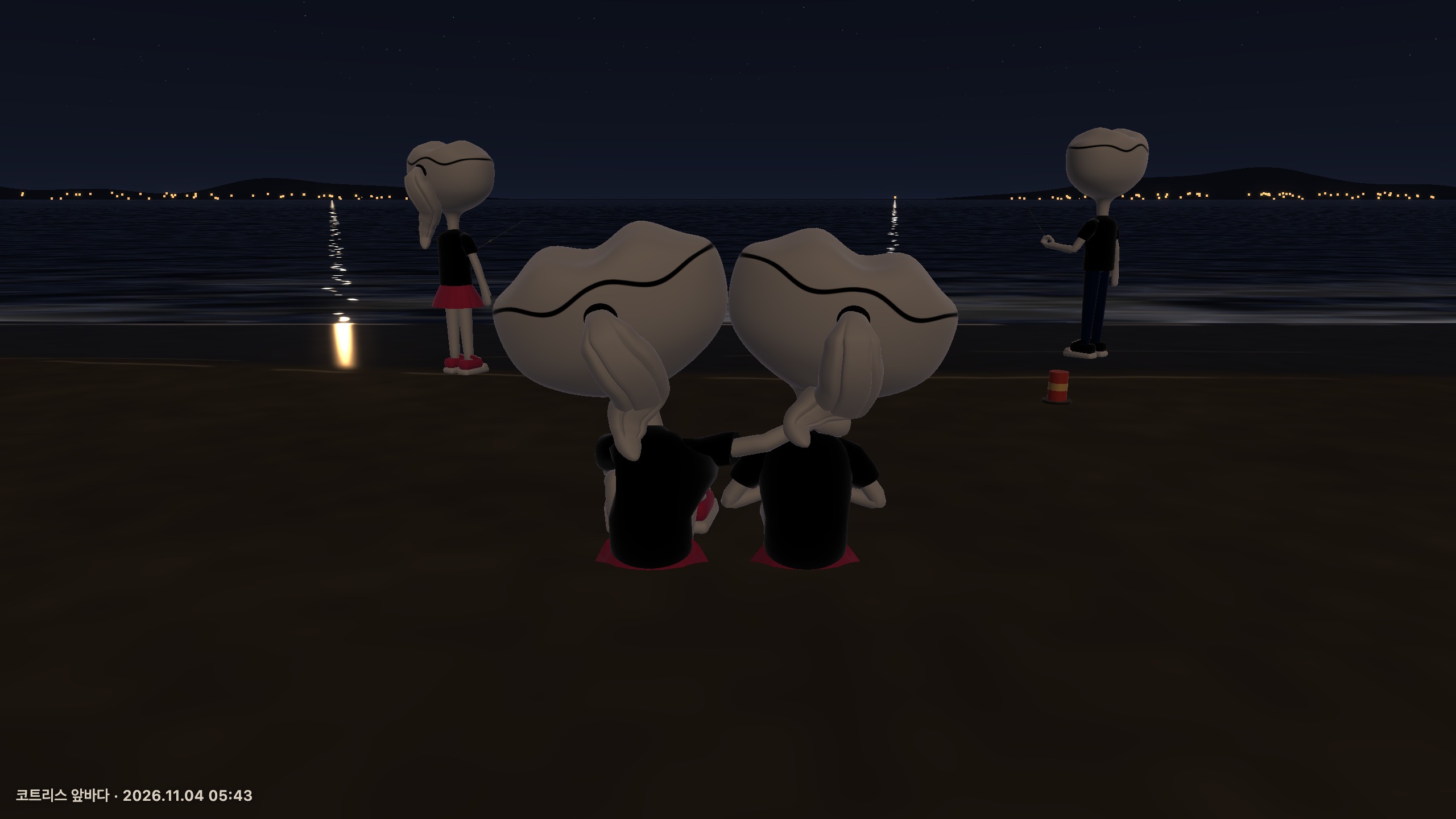
Korsh characters sitting side by side in the current version. Captured in local simulation mode on November 4, 2026. The accompanying character is computer-controlled.
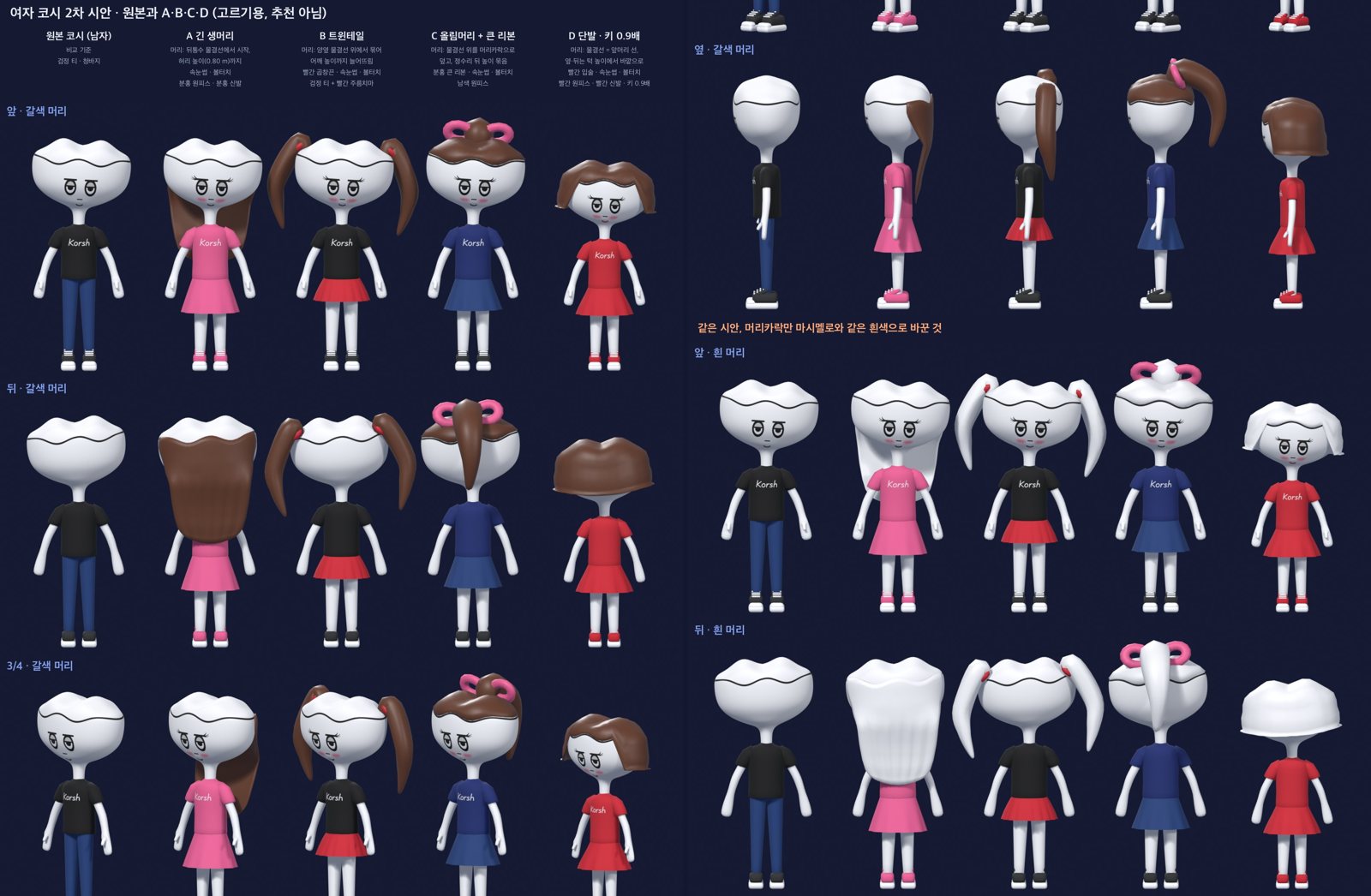
Development studies comparing the female Korsh character’s appearance. These exploratory Blender renders are not a list of characters currently available to select.
This making-of article introduces the features and records what I fixed behind those scenes.
The code review is based on commit 0280637 from November 4, 2026.
I distinguish newly captured screenshots of the current version from archived development footage.
Mina in the videos is the test partner's nickname, not the female Korsh character's name.
To explore the space that inspired this project, you can start with the wordless interactions I examined in Sansa.
A 19-second tour: walking, sitting and fireworks — an introduction staged and filmed in a local scene
What can you do at the beach?
When entering Kortress Beach, you choose a nickname and character. You can then walk around the beach or select a tool and light fireworks. You can explore alone or invite someone else to share an activity.
The current tool menu has five options in addition to empty hands. They are a handheld sparkler and handheld repeater, plus a ground fountain, bursting repeater, and large-bloom repeater. Fireworks glowing near your hand and those rising into the distant sky call for different viewing distances. The process of holding a tool or placing it on the ground also varies with its type.
| What you want to do | On-screen action | What to look for |
|---|---|---|
| Explore the beach | Move, rotate the view, or zoom | The distance between the character and the horizon |
| Light a small firework | Select a sparkler or handheld repeater, then ignite it | The motion of the hand and the tool's tip |
| Place fireworks on the ground | Place a fountain or repeater, then ignite it | Spacing between tools, the lighting pose, and launch direction |
| Write with light | Draw lines directly in the sparkler-writing interface | The connection between the drawn line and the character's arm |
| Spend time together | Invite someone to sit side by side or walk hand in hand | Distance and gaze after acceptance |
| Listen to the same song | Share YouTube music through listening together | Keeping music active while sitting or walking |
On desktop, use WASD or the arrow keys to move, and drag to rotate the view. The scroll wheel adjusts distance, Shift runs, and Space jumps. F places or lights a tool, depending on the situation. At first, it is easier to follow the tool names and action buttons on screen than to memorize shortcuts. On mobile, I added a dedicated movement pad and jump button.
Sitting and walking together draw on earlier memories
Earlier memories are part of the features for sitting side by side, walking together, and listening to music together. I made it possible to sit together between fireworks and listen to the same music while seated. The wish to create an intimate atmosphere in Beach shaped these actions as well as the characters' appearance.
From an invitation to sitting together — a development prototype tested with the computer-controlled partner Mina
Watch: Looking at each other — development prototype
A shared action begins by selecting another person, sending an invitation, and waiting for acceptance. It might seem sufficient to place two characters in a scene and play a predefined animation, but there was much more to prepare. If they are apart, they need to approach each other, and their models may finish loading at different times. Either person might cancel or lose their connection while waiting. A canceled preparation task that finishes late must not overwrite the new state.
That is why the code includes request, approach, preparation, and active states, along with cancellation handling. It sets time limits for approach and preparation, resends readiness signals, and filters out stale asynchronous tasks. Even a short scene involving two people had to come together in the same order on two different screens. If too much time passes after a button press with apparently nothing happening, interest can fade before the scene begins.
In particular, cloning the actual character rigs and measuring palm surfaces and walking data at the moment of acceptance was costly. I moved measurements that did not need to be repeated into prepared data and reused existing materials and walking tables. Fingerprints are also checked so that old data is not reused unchanged when the models or calculation methods change. What I wanted to shorten was the repeated preparation needed to start an action, rather than the action itself.
The changes and scope of verification are recorded in the repository's deploy/couple-stability-2026-11-03.md.
Holding hands makes wrist misalignment stand out
Watch: Walking hand in hand — development prototype
When making characters walk hand in hand, getting the hands to meet was more difficult than moving both characters at the same speed. Simply placing the hands near each other can leave palms facing the wrong way or arms stretched awkwardly. Trying to solve that with rotation at the wrist alone can twist the skin like a candy wrapper.
The current implementation establishes contact using the centers and orientations of the palms, then repeatedly adjusts both arms. It also adjusts the contact point in poses where the arms cannot reach far enough. Another step distributes twisting through the shoulder and forearm so it does not accumulate at the wrist. Finger shapes for gripping and clasping are treated as part of the pose as well.
The IK used here works by setting where a hand should be and then adjusting the arm joints to match. The result matters more than the name. Even when bodies move and heads turn, the hands need to preserve their relationship with the other character. I also had to check whether hands that looked fine in a still image became awkward when walking began.
I made the head rotation for looking at each other, and the weights and speeds used when walking and stopping, change gradually. However, not every transition into or out of sitting is connected by a fully finished, continuous full-body animation yet. I want to distinguish the parts already refined from those that still need more natural movement.
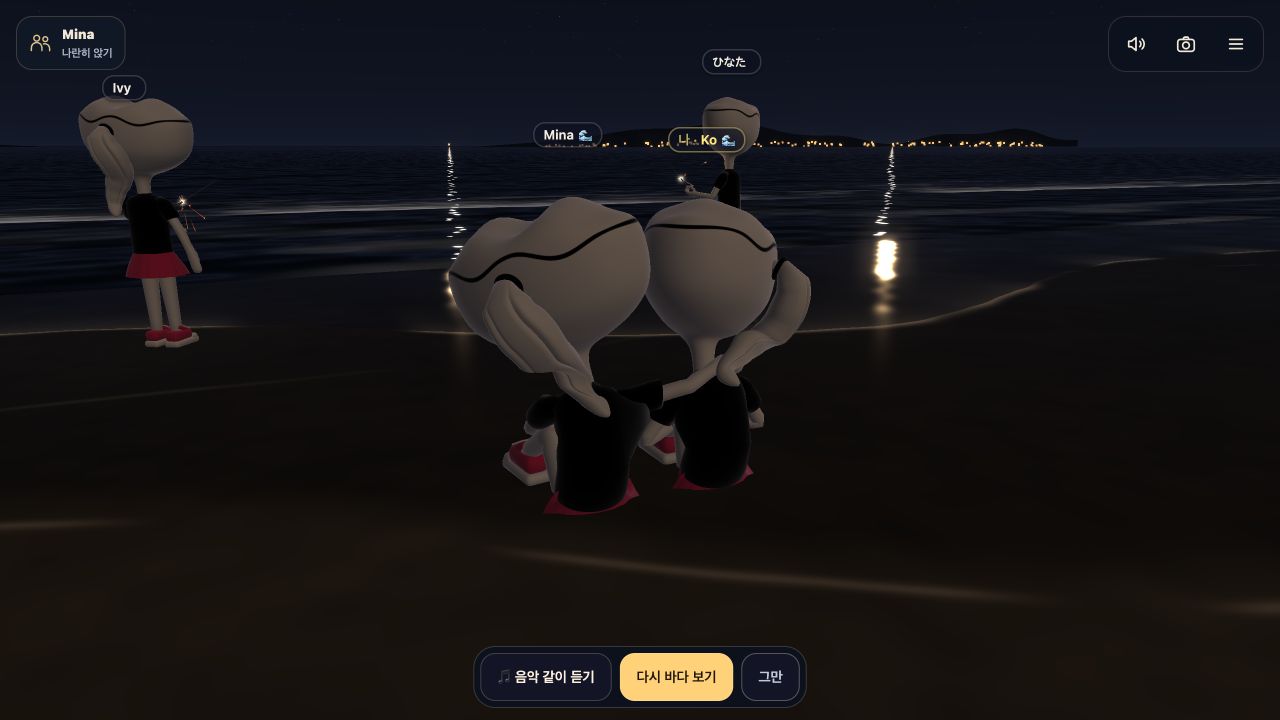
The current version's look-at-each-other feature, captured with a computer-controlled character in local simulation.
The ground needed to get wet after the wave reached it
The sea and the wet ground received particular attention. Adding sparkle to the water and darkening the sand was not enough to make it look like a shoreline. Even a small sequencing error made the waves feel like a background effect.
Feedback preserved in the code points out that the ground became wet before the wave came in, making the order look reversed. Previously, when a new wave started, the entire area up to its eventual farthest reach was already treated as wet. The shape of the previous wave's marks also changed abruptly when the next wave began. Two problems overlapped: the wet marks preceded the water, and those marks changed discontinuously.
Before: Shoreline waves — development prototype
After: Shoreline waves — development prototype
These two videos compare wave rendering during development; they are not a controlled experiment isolating only the current wetness implementation described below.
The current version records only the farthest point the current wave has actually reached. At the same time, it separately remembers the previous wave's farthest point, pattern, and retreat time. Starting a new wave no longer replaces the previous marks with a new pattern. The earlier wave's marks dry on their own timeline, while the next wave creates new marks only as far as it has actually advanced.
In sequence, it works like this:
- A white wave approaches the shoreline.
- The wet area expands only as far as the water reaches.
- The water retreats, leaving wet marks behind.
- The remaining marks gradually lose their darkness and gloss.
- As the next wave arrives, the still-visible marks from the previous one are included in the calculation.
Wetness decreases in the form exp(-age/9).
This is gradual decay over time, rather than a timer that makes everything completely dry after 9 seconds.
The value feeds into the sand's color, gloss, sky reflections, and response to firework light.
Before deciding how much a surface should sparkle, the system can now account for why that spot is still wet.
The timing of incoming and receding waves is also aligned with the sound of surf. The white lines offshore, the lines coming into the shoreline, and the foam left behind serve different roles. This is not a full fluid simulation. It is a procedurally staged sea in which visible traces and audible sounds refer to the same wave.
This revision shows that convincing scenery depends on connections between frames as well as the appearance of a single frame. The result of one moment needs to remain in the next. On the wet sand, that memory took the form of briefly lingering wave marks.
The moment a fuse lights is part of the scene
I also put work into making the firework tools feel convincing. Pressing the button shows the character handling and lighting the tool. A handheld tool and a tool on the ground need different lighting poses to begin with.
Watch the lighting motion — reaching out and lighting a tool in a development prototype
The current code gives handheld and ground tools separate times for reaching the ignition point and completing the motion. To light a tool on the ground, the character turns and lowers its body. If only the torso bends, the feet can appear to slide along with it. I therefore store the feet's positions and orientations, then adjust the leg joints to keep the feet in place.
The arm holding the ignition stick is adjusted again so the tip in the right hand reaches the fuse. After ignition, there is also time for returning to the holding pose. What matters is not just the brightness of the firework, but that the hand, stick tip, and fuse all depict the same event. If the hand points elsewhere when the fire lights, the sense of using a tool becomes weaker.
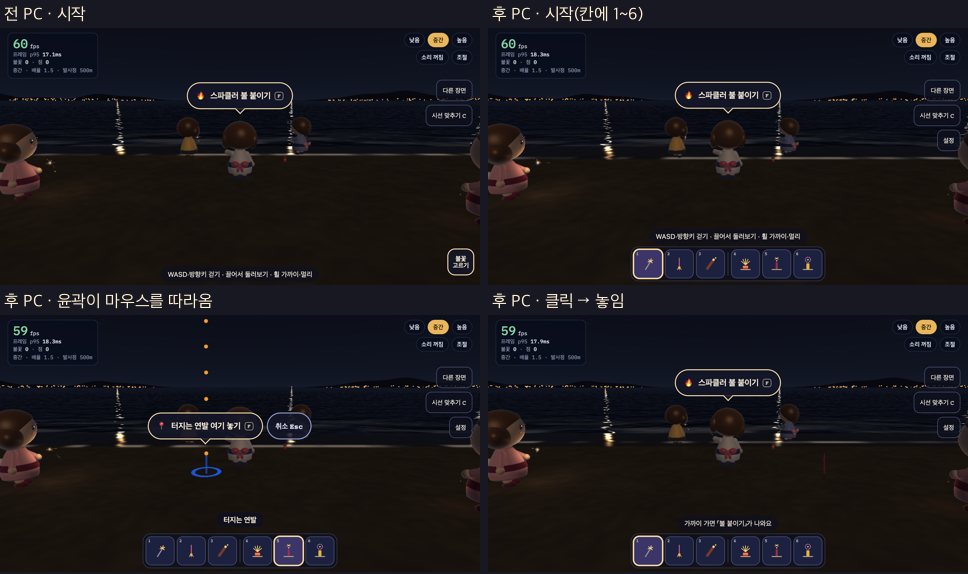
Before-and-after comparison of an early desktop tool-placement interface: tool selection, position preview and placement. The characters and interface differ from the current release.
I also gave the tools different kinds of effects. The sparkler produces a sustained light near the hand, while the fountain sends a spray upward from the ground. Repeaters and large blooms have sequences of launches and bursts. These distinctions do not mean that every aspect of pyrotechnic physics has been reproduced accurately. The work is about making the placement, ignition, and resulting light make sense within the scene.
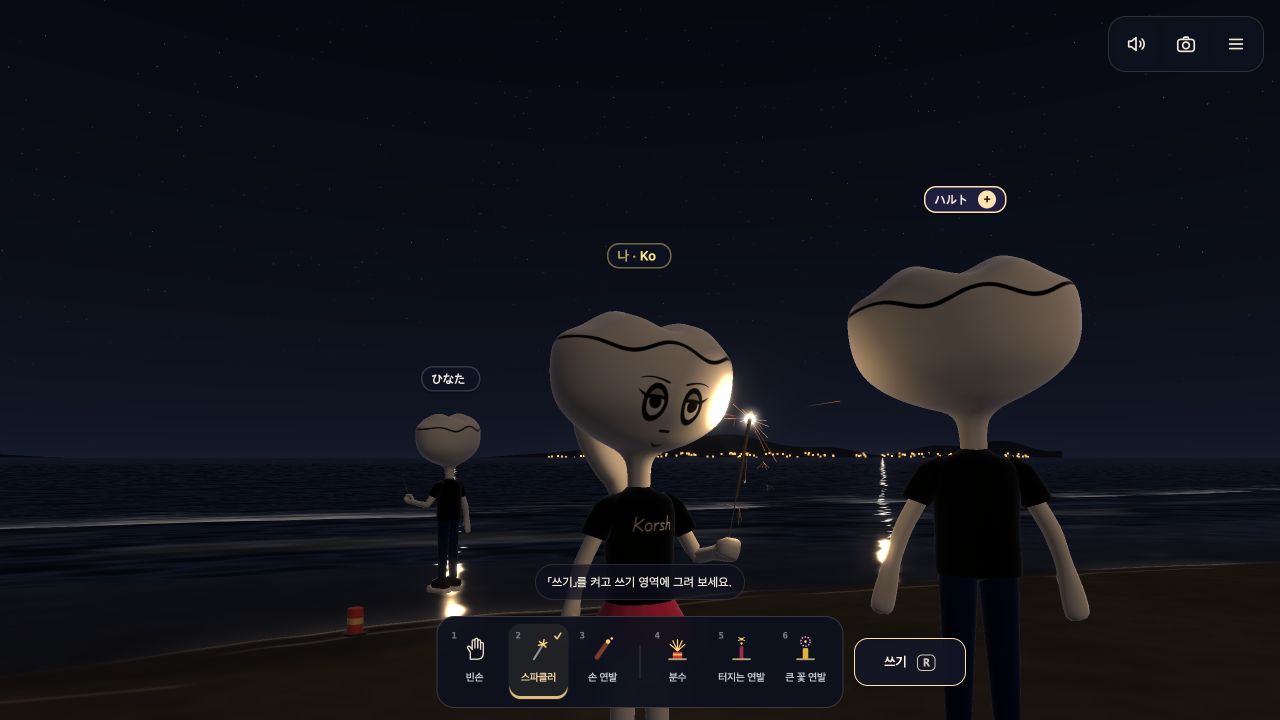
A handheld sparkler lights the face and surroundings in the current version. Captured from a close angle in local simulation.
I also compared the controls for choosing a firework’s launch direction. The development footage below compares moving an on-screen target with the earlier input method.
Comparing launch-direction controls before and after — a development prototype with earlier characters and interface
Connecting a sparkler's drawn line to the character's hand
Writing with light — coordinate-mapping comparison during development
Sparkler writing is different from typing text and displaying it on screen. It connects lines drawn directly by the user to the path of the tool the character is holding. The video above compares input and arm movement during development; the current interface uses a full-screen canvas.
A mouse or finger moves across a flat screen, while the character's hand exists in three-dimensional space. Mapping screen coordinates directly into a large space can create points the hand cannot reach. The character's arm length, tool orientation, and the size of the writing plane had to be considered together.
The current version normalizes input coordinates against the canvas, then maps them into a writing space within the arm's reach. Enlarging the input area is not the same as enlarging the character's movement. Drawing should be comfortable even on a small screen without making the hand reach unnaturally far in the scene. Switching to a full-screen writing interface was also part of organizing that input experience.
For the reader, it is a brief act of drawing a line, but making it required handling screen input and the character's body together. The firework trail is connected to the motion of the tool in the hand.
Shared music carries through the time spent sitting
Listening-together interface — development prototype, silent recording
The feature for listening to the same song together also draws on earlier memories. That is why starting music does not require ending a sitting or walking activity first. Music can be added with someone you are already sitting or walking with. The code likewise preserves the existing shared action and connects a music state within it.
Music uses YouTube playback. The requesting side periodically sends a reference playback time, and the receiving side accounts for the time elapsed since transmission. If the playback position differs by more than 2 seconds, it seeks to the corresponding position. The two screens do not run on exactly the same audio clock, and they do not share each other's buffering state.
Embedding restrictions on external videos and browser autoplay policies also have an effect. There are paths for displaying errors when playback is blocked and prompting manual playback when it does not start automatically.
The video above demonstrates the sharing interface with a test partner. It is separate from a test of actual network playback between two people.
Other people need to see the beach as it is now
Watching fireworks alone and watching them with other people pose different implementation problems. Someone arriving later needs to see tools already placed on the ground. If someone lights a tool, that tool needs to appear lit on other screens too. I also had to address cases where a seated person's hand pose looked wrong to an observer.
Beach does not continuously transmit the coordinates of every firework particle. It sends information such as tool type, position, progress, and time separately, and each screen constructs the effects. The transmission intervals also distinguish rapidly changing handheld tools, character movement, and ground tools that remain longer. Ground tools resend their complete list to reconcile missing state; an empty list is sent too, so stale tools are removed.
For characters sharing an action, I did not stop at transmitting the action's name. There is also logic to transmit and restore the actual pose after animation and joint adjustments, including the shape of gripping fingers. Knowing that someone is “sitting” and knowing their current sitting pose were different pieces of information.
I added mechanisms for connection recovery and late arrivals, but that does not mean every interruption is gone. Settings such as the current room capacity are also different from performance measurements showing smooth operation across multiple real devices.
Refining the controls before the beautiful scene
Recent changes include running, jumping, entry guidance, and mobile controls. Running changed from a sped-up walk to a separate Run animation. I added running data while preserving the existing rigs and animations, and checked motion by measuring the actual shoe and hand geometry. The records continue with further adjustments to arms, wrists, and stride timing.
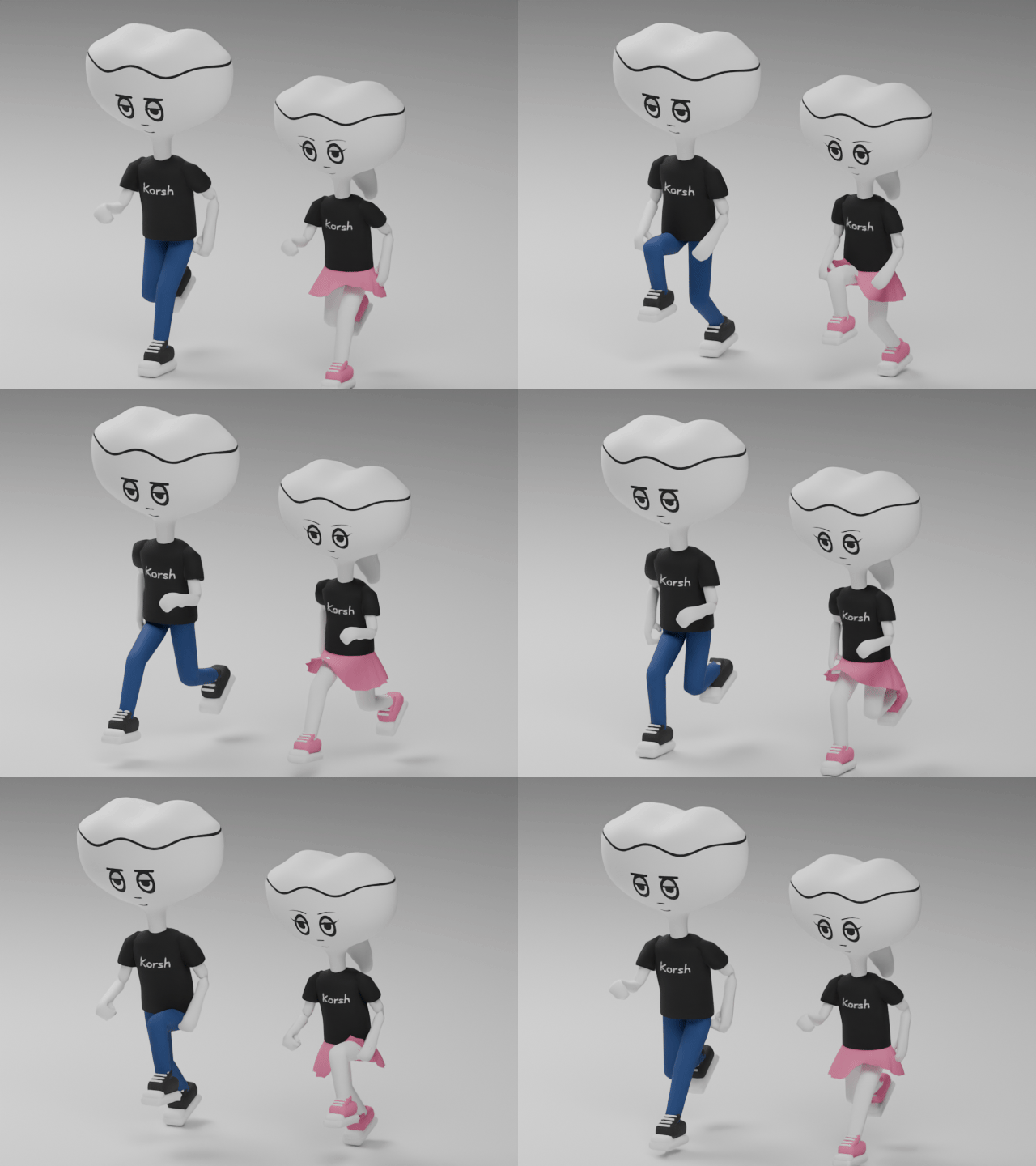
A development preview used to check the two Korsh characters’ running animation, rather than footage from the beach.
On mobile, the invisible movement hit area was larger than the visible pad, which could make the character move when the user intended to rotate the camera. I refined the movement area and thumb placement while considering screen edges and the tool bar together. Checking that buttons do not overlap on a small screen is separate from checking heat and frame performance on an actual phone.
During entry, I also prevented controls from becoming active before the character was ready. Long waits or errors now show a status and offer a retry. Movement instructions appear after entry. Not knowing what to do on the beach, or waiting with a screen that appears frozen, was also part of what the implementation had to address.
These small interruptions are also the next items to check. The criteria are whether newcomers understand movement, whether they understand the wait after an invitation, and whether ending a shared action feels awkward. Even with hand-holding and shared music available, the intention will not come through fully if reaching that scene is difficult.
The inspiration from Sansa continued into Beach through Korsh, the sea, fireworks, and music. What I worked on was connecting small movements and traces so that spending time together would not feel awkward.
Visit and keep reading
Implementation and capture basis
The implementation descriptions were cross-checked against the Beach repository's web/index.html, networking code, November 3–4, 2026 change history, and shared-action stability report.
Current-version screenshots were captured in local simulation using the public deployment on November 4, 2026.
Development footage comes from separately archived prototypes and is not used as evidence of actual visitors or production performance.
Detailed sources and the original media list are kept separately in the research report prepared for this article.