If you are in a long-distance relationship, or your closest friend moved away, you end up with almost no photos together. You talk constantly, but what you keep is a handful of video-call screenshots. And those never really look like photos. The window is split in two, the quality is rough, and more to the point, it is not a picture of you together — it is two faces on separate screens.
NetCut is an attempt to fill that gap. Two people walk into the same four-cut booth and end up side by side in one frame.
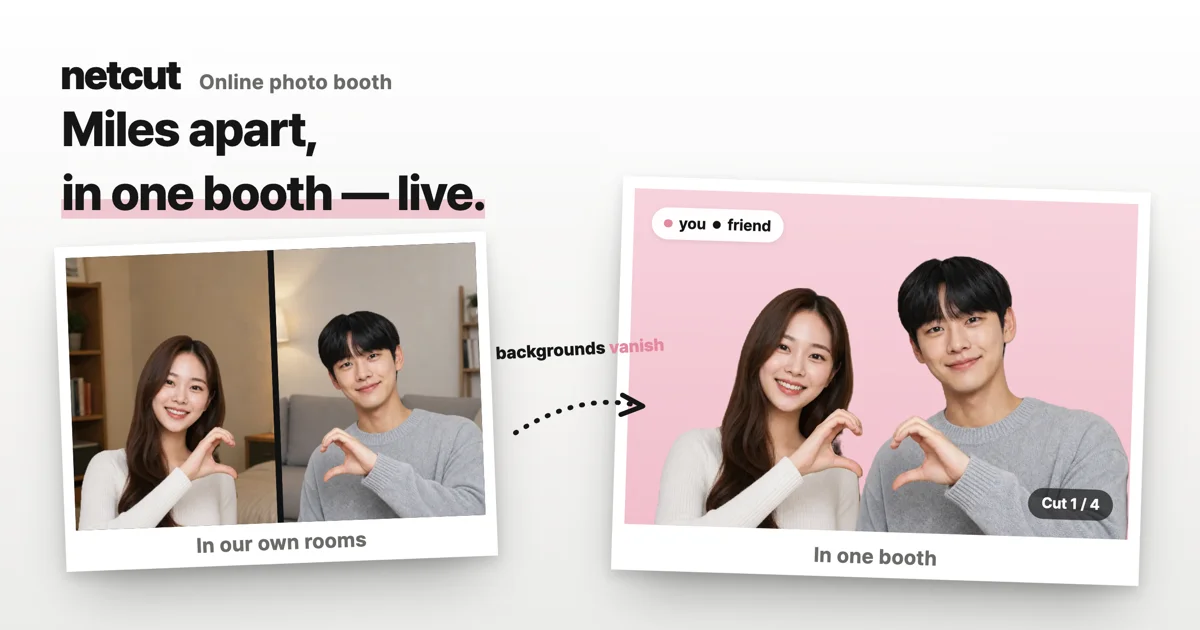 Only the rooms get removed — the two of you land on the same booth backdrop.
How a shoot actually goes
The flow is simple. You create a booth, you get one link, you send it. Whoever receives it just taps it and lands in the same booth. Nothing to install, and the person you invited does not need an account. Any browser with a camera works.
Once you are both in front of a webcam, your rooms disappear and the two of you are placed on the same booth backdrop. You can see each other live, so you can match poses in real time. You shoot six cuts and keep the four you like best. Don't like them? Shoot again.
After that you match the tone with a filter, and if you want, let AI tidy it up once more. Then you download it. The behind-the-scenes clip of the shoot comes with it.
To be honest, it is a composite
This part is better said upfront. NetCut removes each background and places both of you on a shared booth backdrop. It is not identical to standing next to each other.
The cutout isn't perfect either. Fine areas — the tips of your hair, the gaps between fingers — can come out rough. Bright light and a plain background behind you help a lot.
That said, it looks far more like one photograph than a video-call screenshot does. The goal was never "as if we had really been there together." It was "as if this were one photo."
What the AI polish does
Removing a background in real time occasionally clips a fingertip or smudges the space between fingers. AI polish fills in those awkward edges and lightly evens out skin and lighting.
It does not reshape your face. Think of it as the touch-up a print shop does before printing. Each cut is processed separately so people don't get mushy.
What's free and what isn't
Opening a booth, shooting six cuts, previewing them, picking four and downloading them — all free.
Credits come in at one moment: confirming the four-cut strip you shot together. At that point the person who opened the booth spends 10 credits. Leave before that and it costs nothing. Keeping a strip in your gallery is 5 credits, and one AI polish is 5. Signing up gives you 15 credits, which is enough for your first strip.
Shooting solo is free end to end — shooting, picking and downloading. You can open a booth alone first and see what it's like before deciding.
Limits worth knowing
The connection does not always hold. Corporate firewalls and some mobile networks can't link two people directly. When that happens, retrying from another network — home Wi-Fi, say — is usually the fastest fix.
There is also a time limit on being together. After the shoot, the call on the result screen where you decorate and talk runs for 10 minutes. When it ends, only the call ends; decorating, saving and downloading all keep working afterwards.
By default photos are only downloaded to your device. Sign in and you can keep them in your gallery, and photos with two people in them need both of you to agree before they're saved. Neither person can quietly keep a photo of the other.
Where this lands
NetCut isn't trying to replace video calls. People already make plenty of those. What was missing was that none of that time turns into a photo.
Having one four-cut strip with someone far away, versus having none, turns out to matter more than it sounds. Making that one strip easy to get is the whole point of this tool.
No install, no sign-up for guests, just a link — so if you're curious, opening one by yourself first is a perfectly good place to start.
- Try it: NetCut — online photo booth
- Related: Kortress app list guide