
News · · 7 min read
Siri AI Adds Korean in iOS 27.2: What Changed and Where Apple's Own Docs Disagree
In this post
Apple released iOS 27.2 on October 26, 2026, and with it Siri AI became available in Korean. French, Japanese, Portuguese, and Spanish opened the same day, bringing the total to six languages including English. Siri AI is still a beta and requires an iPhone 15 Pro or later. Apple's documentation, however, does not yet tell one story. When we compared five Apple pages on October 28, the Newsroom posts and the update notes listed Korean, while the Siri AI setup guide still said "English" and the feature availability page still listed Korean as "coming later this year." Apple's Korean Newsroom presents sub-features such as Write with Siri and Visual Intelligence as part of the Korean launch, but the only page that lists sub-features by language still says English.
This article covers what 27.2 added to Siri AI, which devices can turn it on in Korean, how five Apple documents describe language support, the language rollout schedule, and early user reactions.
What 27.2 adds to Siri AI
Siri AI is Apple's new Siri built on Apple Intelligence. It understands personal context across messages, mail, and photos, answers questions about what is on screen, and carries out actions in apps. It launched as an English-only beta with iOS 27 on September 14, and 27.2 is its first expansion.
Apple's "About iOS 27 Updates" page lists five Siri AI changes in 27.2. Siri can recall past conversations, so you can ask about something it told you before, such as restaurants it recommended last week. It draws on more personal context: photos attached in Messages, Calendar event attendees, voicemails, and better results from Safari history and Reading List. A new Excluded Apps setting lets you choose, in one place, which apps Siri, Search, and suggestions can access, and granular text selection lets you copy part of a Siri response. The fifth line is the language expansion.
The first four are new for English users too. Korean speakers get everything at once: the features that shipped in English in September plus this release's additions.
Devices that can run Siri AI in Korean
iOS 27.2 itself installs on iPhone 11 and later. Siri AI, though, only turns on for Apple Intelligence devices. We compiled the device requirements from two Apple documents:
| Feature | Eligible iPhone | Source |
|---|---|---|
| Install iOS 27.2 | iPhone 11 and later | Apple security releases (100100) |
| Siri AI | iPhone 15 Pro and 15 Pro Max, all iPhone 16 models and later, iPhone Air, iPhone Duo | How to get Siri AI (127893) |
| Expressive voices | iPhone Air, iPhone 17 Pro and later, iPhone Duo | How to get Siri AI (127893) |
An iPhone 15, 15 Plus, or older model can install 27.2 but cannot turn on Siri AI. Customizing voice pace and expressiveness needs the on-device AFM Core Advanced model, so that list is narrower. On iPad, Siri AI needs an iPad mini with A17 Pro or an M1 or later model.
To turn it on, go to Settings > Siri > Try Siri AI (Beta). The device language and Siri language must be set to the same supported language. After voice enrollment you join a waitlist, and Siri AI downloads automatically when your turn comes; Apple says only that wait times vary. Users under 13 cannot use it. Features that rely on server-side models have daily usage limits, and Apple says expanded access will be offered for a fee in the future.
How five Apple documents describe Korean support
Apple describes the same feature across several pages. On October 28 (Korea time) we opened five of them and compared what each says about Siri AI languages:
| Document | Siri AI languages listed | Notes |
|---|---|---|
| Apple Newsroom, Oct 26 | English, French, Japanese, Korean, Portuguese, Spanish | Beta; excludes iOS, iPadOS, watchOS in the EU |
| Apple Newsroom Korea, Oct 26 | Korean, English, French, Japanese, Portuguese, Spanish | Also presents Write with Siri, Visual Intelligence, Siri mode in Camera; "some features may not be available in all regions or languages" |
| About iOS 27 Updates (149076), 27.2 entry | Adds French, Japanese, Korean, Portuguese, Spanish | Not in the EU or mainland China |
| How to get Siri AI (127893) | "currently available in English" | Published October 22, 2026 |
| iOS feature availability (Korean edition) | Siri AI, Write with Siri, Visual Intelligence, Siri mode in Camera: "English". Footnote: Korean "coming later this year" | Expressive voices: English (UK), English (US) |
The three announcements include Korean; the two reference pages still reflect the pre-27.2 state, as the feature availability footnote still calling Korean "coming later this year" shows. Korean support for Siri AI itself is settled, since both the Newsroom posts and the update notes state it. The open question is the sub-features. Apple's Korean Newsroom presents Write with Siri, Visual Intelligence, and Siri mode in Camera within the Korean launch announcement, but covers language availability only with the generic caveat that some features may not be available in all regions or languages. The feature availability page is the only document that lists sub-features by language, and it has not been updated. The sub-features most likely opened too and the page simply lags behind, but Apple's documents do not confirm it.
Six of sixteen languages
Apple Intelligence already supports 16 languages, Korean among them. Siri AI covers only some of those. We plotted Apple's three announcements on one axis:
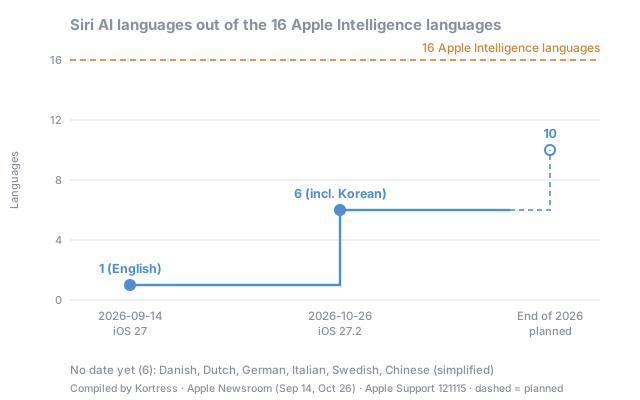
At its June 8 announcement, Apple said Siri AI would launch in English and quickly expand to more languages. On September 14 it said five languages, Korean included, would follow "next month," and it delivered on October 26. Chinese (traditional), Norwegian, Turkish, and Vietnamese are planned by the end of the year. Six languages that Apple Intelligence supports have no Siri AI date yet: Danish, Dutch, German, Italian, Swedish, and Chinese (simplified). Five of them are official EU languages, and simplified Chinese overlaps with mainland China, where Apple Intelligence does not yet work. Regional regulation appears to be shaping the language order.
Early reactions
Korean-language reviews are still scarce this soon after launch. On October 27, a user posting as 레이지냥 on the Korean community FMKorea ran a self-test with 16 questions on an iPhone 17 Pro Max: 12 correct, 2 wrong, and 2 where the author judged their own question ambiguous. They trusted it with arithmetic and summaries ("계산은 믿어도 될 거 같아요," roughly "I think you can trust the calculations"). But when asked whether there was milk in the fridge, Siri replied that it could not get the status of the Apple TV, and the author concluded that device-related requests still need double-checking. The author noted that each question was asked only once, so it is closer to a hands-on impression than a formal evaluation (FMKorea).
On the MacRumors forums, reactions were split. svish wrote, "Good to see that more languages will be supported shortly and that more users can access it." JWD replied, "Why don't you fix English first Apple?" (MacRumors Forums).
What this means for Korean speakers and app developers
The main change is that Korean speakers with an iPhone 15 Pro or later can use Siri AI without switching their device to English. Between September 14 and October 26, using Siri AI required setting both the device language and Siri language to English. Apple lists only the EU and mainland China as excluded regions, so Korean accounts appear to be eligible. Because of the waitlist, though, Siri AI may not turn on immediately after updating.
For sub-features, checking on the device is the safer route. Since the Korean Newsroom presents Write with Siri and Siri mode in Camera in its Korean launch post, they likely opened as well, but until the per-language listing is updated, the documents do not confirm it. Expressive voices are documented as English (UK and US) only, so they appear to be unavailable for a Korean voice.
Two things matter for app developers. First, the Excluded Apps setting in 27.2 lets users remove an app from Siri, Search, and suggestions in one step, so an app's presence in Siri suggestions can disappear with a single user setting. Second, Siri AI's app actions will now be invoked by Korean speakers in Korean. Apps that have only been tested with English phrasing will likely need checking to confirm that Korean requests trigger the intended actions.
Limitations
| Item | Details |
|---|---|
| Performance data | Apple has published no Siri AI benchmarks, and we found no third-party measurements. The only evidence on Korean quality is one user's single-pass, 16-question test |
| Hands-on use | This article compares official documents and public reactions. It contains no results from using Siri AI on a device ourselves |
| Comparison date | Documents were checked on October 28, 2026. If Apple updates the setup guide and feature availability page, the last two rows of the comparison table will change |
| Region | The conclusion that Korean accounts are eligible is inferred from the list of excluded regions. Apple does not list eligible countries |
| Waitlist | Apple has not disclosed waitlist times |
Sources
- Apple Newsroom, Siri AI is available in more languages starting today (2026-10-26): https://www.apple.com/newsroom/2026/10/siri-ai-is-available-in-more-languages-starting-today/
- Apple Newsroom Korea, Siri AI, 오늘부터 한국어로 이용 가능 (2026-10-26): https://www.apple.com/kr/newsroom/2026/10/siri-ai-is-available-today-in-more-languages/
- Apple Newsroom, Siri AI, a profoundly more capable and personal assistant, is here (2026-09-14): https://www.apple.com/newsroom/2026/09/siri-ai-a-profoundly-more-capable-and-personal-assistant-is-here/
- Apple Newsroom, Apple introduces Siri AI (2026-06-08): https://www.apple.com/newsroom/2026/06/apple-introduces-siri-ai-a-profoundly-more-capable-and-personal-assistant/
- Apple Support, About iOS 27 Updates: https://support.apple.com/en-us/149076
- Apple Support, How to get Siri AI: https://support.apple.com/en-us/127893
- Apple Support, Get started with the next generation of Apple Intelligence: https://support.apple.com/en-us/121115
- Apple Support, Apple security releases: https://support.apple.com/en-us/100100
- Apple, iOS feature availability: https://www.apple.com/kr/ios/feature-availability/